
Accessibility auditing built into WordPress. Not bolted on top.
Scan, locate, fix, document, and monitor WCAG issues inside WordPress - with real remediation in your actual content, not a front-end overlay.
An overlay is not an evaluation record.
Overlay widgets add front-end controls at runtime without changing the underlying content or markup. ComplyClear works on the content, markup, and styling itself, and keeps a dated record of what was found and what was fixed.
A script adjusts the page as it loads. Your content and markup are unchanged, and nothing is documented.
Finds, locates and helps fix issues in your real WordPress content - then documents it.
See where your site stands in seconds.
Enter a website address for an automated WCAG 2.1 / 2.2 AA and Section 508 issue summary. No signup - the fastest way to see where you are today.
Automated results are issue summaries, not compliance certifications.
Most tools stop at detection.
With ComplyClear Accessibility, every issue is carried from detection through to a documented, monitored fix.
-
01
Scan
Automated WCAG checks across every page and template.
-
02
Identify
Each issue mapped to its exact WCAG success criterion.
-
03
Locate
Jump to the element in the page builder - no source hunting.
-
04
Fix
Inline guidance to remediate in your real content and styles.
-
05
Document
Per-page findings and exportable records of the work you have done.
-
06
Monitor
Scheduled scans and regression alerts. Never one-and-done.
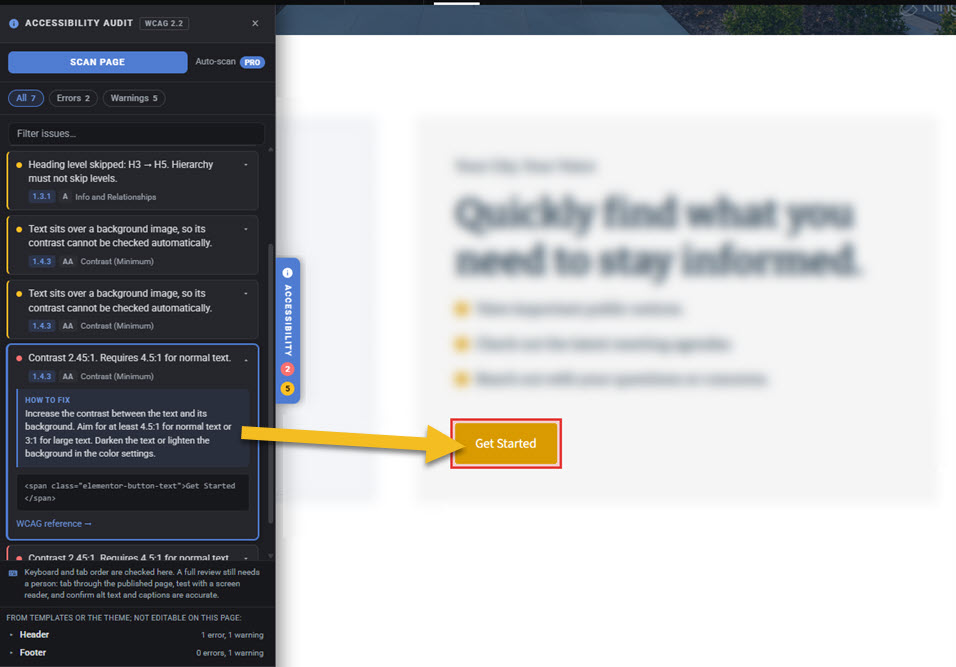
Issues shown right inside your page builder.
ComplyClear shows accessibility issues in context and separates page content from template and theme output - so you move from detection to remediation without touching source code.
- Click any issue to highlight the affected element
- Page content separated from theme & template output
- In-editor panel for Elementor and the block editor, with site-wide scanning on any theme
Find, fix, document, and monitor in one plugin.
Find issues in context
Click any WCAG issue and jump directly to the element in the editor. No hunting through source code.
Document your work PRO
Full-site reports with per-page findings, scan history, and exportable CSV / PDF records - the evidence procurement offices and grant programs ask for.
Monitor over time PRO
Scheduled daily, weekly, or monthly scans with emailed regression alerts, so you catch new issues before they grow.
The clock is running for municipal websites.
The DOJ's ADA Title II rule requires state and local government websites to meet WCAG 2.1 AA, with limited exceptions. ComplyClear gives municipal clerks, administrators, and their web vendors a practical path to identify, fix, document, and monitor issues before the federal deadlines.
Entities serving 50,000+ people.
Smaller communities and special districts.
The standard named in the DOJ Title II rule.
Built for public-facing WordPress sites.
If you publish pages and documents the public relies on, this fits your site.
Pages, PDFs, agendas, forms, and posted documents all matter.
Cities, villages, towns, counties, and public agencies preparing for ADA Title II.
Developers needing repeatable audits, client reporting, and remediation workflows.
Ministry sites with sermons, events, giving pages, calendars, and public resources.
Clinics and practices with patient-facing information, forms, and appointment paths.
Donation pages, program information, public resources, and community services.
Calendars, forms, announcements, staff pages, and family-facing resources.
Ready to get started?
Install the free ComplyClear plugin, scan and fix WCAG issues right in your editor, and add Pro when you are ready to remediate at speed and keep a dated record of the work. Ask us about licensing for multiple sites.
Need an accessibility-focused website build?
Startec Web Solutions builds WordPress sites around WCAG 2.2 AA practices for organizations across Wisconsin. ComplyClear Pro is included with every build, so monitoring starts on day one.